
Enhancements
Tasks
Mass Close Tasks
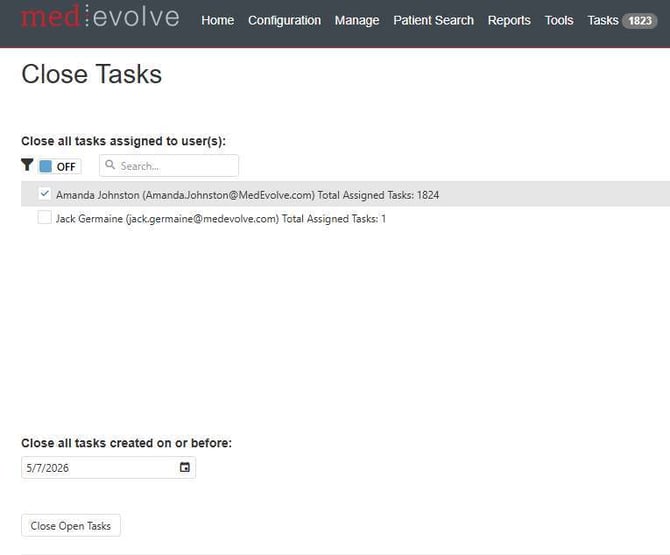
Admins now have the ability to close multiple tasks at the same time. Navigate to Tasks > Close Open Tasks. Select the desired user to close assigned tasks. Then enter a date to close all tasks created on or before the specified date and select close open tasks button.
Improvements
-
Improved grid performance within my task list
-
Resolved an issue in which column sizing did not persist when navigating from task details to my task list
-
Added Date of Service to the Claim Info tab within Insurance AR worklist view
-
Now defaulting my task list assigned selection to “to everyone else” for admins and managers in addition “to me”
-
Managed Visits can now be added for non-managed plans
-
Visit ID has been added as parameter to Task User Productivity report when task is tied to a visit
-
Now grouping patient accounts when splitting Patient AR worklists among multiple users
-
Improved home page summary performance for all modules
- Now reflecting claims worked from Insurance AR Due for Follow Up within the Insurance AR User Productivity report
- Now displaying user name when viewing memos within the Patient View > Billing tab
- No longer displaying disabled worklists within the worklist view selection list for all modules, only enabled worklists are listed for selection
- Redistribution Details no longer times out when there are a large number of worklists configured
- Corrected an issue in which Admins could not clear sorting within the Insurance AR current worklist view grid
- Fixed an issue when working the last claim on an Insurance AR worklist in which the follow up date validations were not presented when expected causing user to advance to an empty worklist view
- No longer presenting an error in configuration selection trees when saving an Insurance AR configuration with several clients
- Now populating the Insurance Provider column within the Insurance AR current worklist view grid
- An error is no longer displayed when selecting the Payment Posting menu option
- Visit Link within Task Detail now navigates to correct visit